Forms are very useful in collecting data from users and then send it to a web server for further processing.
The form element creates an area for data input elements and designates the URL to which any collected data will be transmitted.
An HTML5 example about forms is shown:
<!DOCTYPE html>The rendered internal links example is:
<!--Example 1: Forms.html -->
<html>
<head>
<title> Forms example </title>
</head>
<body>
<h1> Here is an example of a feedback form </h1>
<form method="post" action="http://www.google.com">
<p>
<label> First Name
<input type="text" name="fname" required >
</label>
</p>
<p>
<label> Last Name
<input type="text" name="lname" required >
</label>
</p>
<p>
<label> Email Address
<input type="password" name="email_address" size="30" >
</label>
</p>
<fieldset>
<legend> Which IT course type do you require? </legend>
<p> <label> <input type="radio" name="course" required value="html"> HMTL5 </label> </p>
<p> <label> <input type="radio" name="course" required value="c#"> C# </label> </p>
<p> <label> <input type="radio" name="course" required value="multimedia"> Multimedia </label> </p>
<p> <label> <input type="radio" name="course" required value="networking"> Networking </label> </p>
</fieldset>
<fieldset>
<legend> Extras </legend>
<p> <label> <input type="checkbox" name="extras" required value="examples"> Examples </label> </p>
<p> <label> <input type="checkbox" name="extras" required value="hw"> Homework Assignments </label> </p>
<p> <label> <input type="checkbox" name="extras" required value="quizzes"> Online Quizzez </label> </p>
</fieldset>
<p> <strong> How did you reach this site?: </strong>
<label>Search engine
<input name = "how to reach " type = "radio" value = "search engine" checked> </label>
<label>Links from another website
<input name = "how to reach" type = "radio" value = "link" </label>
<label>Google.com website
<input name = " how to reach" type = "radio" value = "google.com" </label>
<label>Reference in a online article
<input name = "how to reach" type = "radio" value = "article" </label>
<label>Other
<input name = "how to reach" type = "radio" value = "other" </label>
</p>
<p> <label>Rate this site:
<select name="rate"
<option selected> 5 </option>
<option selected> 4 </option>
<option selected> 3 </option>
<option selected> 2 </option>
<option selected> 1 </option>
</select>
</label>
</p>
<p> <label> <Special Instructions: <br>
<textarea name = "comments" rows = "5" cols = "50" > Please enter your feedback here. </textarea >
</label>
</p>
<p> <label> Additionl comments, if any
<textarea name="comments" maxlength="500" > </textarea>
</label>
</p>
<p> <input type = "submit" value = "Submit" >
<input type = "reset" value = "Reset" >
</p>
</form >
</body>
</html>
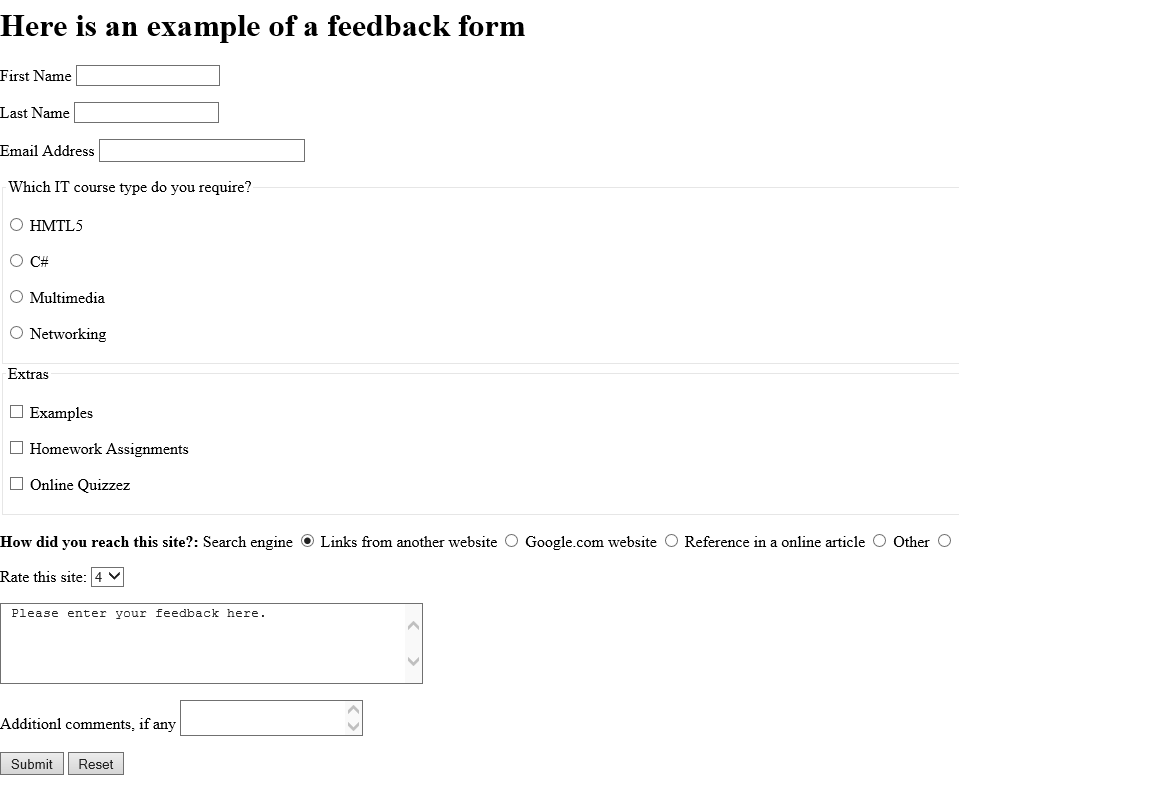
A: An HTML5 form is an element that creates an area on a web page for collecting input from users, such as names, email addresses, and selections. A: GET appends form data to the URL and is simple and easy to test, but unsuitable for sensitive data and limited in size. A: The action attribute specifies the URL of the server-side script that will receive and process the form's data when it is submitted.
A: A checkbox allows users to select one or more options simultaneously. A radio button only allows one selection from a group — choosing one automatically deselects the others.
A: The required attribute prevents a form from being submitted if that input field is left empty. A: A fieldset element groups related form elements together visually and semantically.
Frequently Asked Questions
Q: What is an HTML5 form?
The data collected is sent to a web server for processing using either the GET or POST method.
Q: What is the difference between GET and POST in an HTML form?
POST sends data in the request body, making it more secure and appropriate for passwords, personal information, and large amounts of data.
Q: What does the action attribute do in an HTML form?
What is the difference between a checkbox and a radio button in HTML5?
Q: What does the required attribute do in HTML5 forms?
It is a simple built-in validation method in HTML5 that does not require JavaScript.
Q: What is a fieldset in HTML5?
It is typically paired with a legend element that provides a caption for the group.